
Outdoor Kiosk Supplier: Your Guide to Durable and Interactive Outdoor Displays
2026-08-01
When it comes to outdoor digital displays, not all kiosks are built to brave the elements—and finding a supplier that marries weatherproof durability with true interactivity can feel like a needle-in-a-haystack search. Enter zemso, a name redefining what it means to deploy rugged, responsive outdoor kiosks that don’t just survive the real world, but thrive in it. In this guide, we’ll cut through the noise and explore what separates a forgettable outdoor screen from a powerful, all-season engagement tool—so you can skip the trial and error and focus on what matters: captivating your audience, rain or shine.
Why outdoor kiosks demand more than just a weatherproof shell
An outdoor kiosk faces a daily onslaught that goes far beyond rain and dust. While a sealed enclosure keeps moisture out, the real threats often come from temperature swings, UV radiation, and condensation. Without proper thermal management, internal components can overheat under direct sun or suffer from freezing in winter, leading to screen blackouts or touch failure. Advanced designs incorporate active airflow, heater elements, and anti-glare coatings to maintain readability and responsiveness no matter the weather.
Vandalism and physical impact are equally critical considerations. A weatherproof shell alone won’t stop a deliberate kick or a stray shopping cart. The kiosk must use reinforced glass, tamper-proof fasteners, and rigid frame construction to absorb shocks without cracking or deforming. Even the touchscreen needs impact-rated overlays that can withstand repeated abuse without losing sensitivity. These protective layers demand careful bonding and gasketing to prevent water intrusion at points of structural vulnerability.
Finally, long-term reliability hinges on environmental sealing that goes beyond IP ratings. Salt spray in coastal areas corrodes metal parts, while airborne pollutants can degrade rubber seals. Component selection must account for such extremes, using stainless steel hardware and UV-stable polymers. Serviceability also demands thoughtful design—front-access panels with replaceable filters allow maintenance without uninstalling the unit, and condensation drains prevent internal pooling. It’s this holistic engineering that turns a simple kiosk into a resilient outdoor tool.
The hidden costs of cheap interactive displays in public spaces
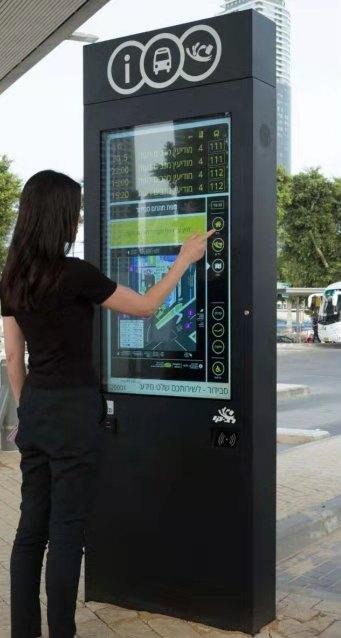
When budget-friendly interactive screens are installed in museums, transit hubs, or retail spaces, the initial low price tag often masks a cascade of long-term expenses. These units frequently rely on lower-grade components that degrade faster under constant public use. Touch sensors lose accuracy, screens develop dead zones, and internal cooling systems fail, leading to frequent repairs. Each service call drains operational budgets, while the resulting downtime frustrates visitors and damages the reputation of the venue. Over a few years, the total cost of ownership can easily surpass that of a pricier, commercial-grade alternative.
Beyond hardware failures, cheap displays often come with limited or poorly maintained software ecosystems. Vendors may abandon firmware updates, leaving security vulnerabilities unpatched—a serious risk for devices connected to public networks. Interactive kiosks collecting user data or processing payments can become entry points for breaches if they run outdated systems. Additionally, the lack of customizability means organizations cannot adapt interfaces to evolving accessibility standards or branding needs without expensive third-party development. These software shortcomings gradually erode user trust and increase the workload for in-house IT teams.
Another overlooked factor is energy consumption and environmental impact. Inexpensive displays typically lack efficient power management or LED backlighting, running at full brightness around the clock to compensate for poor contrast ratios. This not only leads to higher electricity bills but also accelerates component wear. Moreover, when these units reach end-of-life—often sooner than expected—they contribute to electronic waste. Municipalities and businesses may face extra costs for responsible disposal, and the environmental toll can conflict with public sustainability pledges, creating a mismatch between cost-cutting narratives and the actual, hidden expenses that accumulate over time.
Designing for sunlight: readability beyond nits
When displays venture outdoors, the battle for readability shifts from mere brightness to intelligent contrast management. While nits quantify raw luminance, they fail to capture the perceptual interplay between ambient light, screen reflections, and content adaptation. A sunny beach doesn't just demand more backlight—it requires recalibrating every pixel's relationship with its environment.
Effective sunlight design embraces dynamic range compression, selectively boosting shadow details without washing out highlights. Modern high-brightness modes often sacrifice color accuracy for visibility, but the real art lies in preserving the visual hierarchy through non-linear tone mapping. The human eye perceives brightness logarithmically, meaning a 2000-nit display isn't twice as readable as a 1000-nit one under direct sunlight—it's the nuanced distribution of those nits across content zones that determines legibility.
Anti-reflective coatings and circular polarizers reduce veiling glare, yet the most overlooked factor is temporal adaptation. Sudden exposure changes—like moving from shade to sunlight—overwhelm the visual system for seconds, even on the brightest screens. Designing for sunlight thus becomes an exercise in predicting these transitions, gradually shifting gamma curves and white points to mimic the eye's natural adaptation, making the display feel less like a luminous slab and more like a naturally readable surface.
Touchscreen technology that actually works with wet fingers
Most screens turn jittery or unresponsive the moment a drop of water lands on them. The core issue lies in how capacitive sensors interpret the conductive nature of liquid—it creates false signals that confuse the digitizer. Newer approaches tackle this by combining frequency-modulated scanning with machine learning models that can instantly distinguish between a fingertip and a water droplet based on their unique electrical signatures, even when both are present on the screen simultaneously.
Hardware adjustments also play a big role. Some manufacturers now embed a secondary layer of tiny pressure-sensitive nodes beneath the display that only respond to mechanical force, completely ignoring surface moisture. Meanwhile, advanced touch controllers boost the signal-to-noise ratio and rapidly toggle between different sensing frequencies to maintain accuracy. The result feels like a quiet breakthrough—you can scroll through a recipe with damp hands or type a message in the rain without missed taps or phantom touches.
Beyond the lab, real-world implementations are finally reliable enough for tasks like underwater photography buttons or boat navigation systems exposed to constant spray. Developers are fine-tuning algorithms to adapt automatically based on humidity and temperature, so the screen’s behavior remains consistent whether you have a single drop or a full sheet of water. The focus has shifted from merely tolerating wet conditions to delivering a seamless, frustration-free experience that matches dry-use precision.
Mounting, mobility, and the forgotten art of installation
There was a time when mounting a piece meant more than just finding the right bracket. It demanded a certain sensitivity—an awareness of how a painting would breathe against a wall, how a sculpture would stake its claim in a room. Installers once moved with a craftsperson’s rhythm, gliding through doorways without leaving a trace, their footsteps a quiet negotiation between object and space. They understood weight not as a number, but as a force that talks back when you tilt it just so. This kind of mobility wasn’t about rushing; it was a deliberate, almost musical practice of positioning something so that it looked like it belonged.
Somewhere along the way, that art got lost in the push for speed and standardization. We started treating walls like spreadsheets and objects like cells to be filled. The intimate knowledge of how a brass cleat grips plaster, or how humidity can make a frame drift by a whisper—these things faded from daily practice. What remains is a kind of hurried efficiency that forgets installation is a final act of creation, not just a logistical task. The people who still carry this know-how are often invisible, their expertise hidden behind perfectly level lines and surfaces that seem untouched by human hands.
Rekindling that forgotten art means slowing down enough to let materials speak their native language. It’s about moving through a space with the same care you’d use when handling something irreplaceable—because, in those moments, everything is. The forgotten art of installation deserves to be remembered not as nostalgia, but as a practice that honors the quiet dialogue between what we make and where we place it.
Future-proofing your investment: modularity and upgrades
Investing in technology that can adapt over time isn’t just smart—it’s essential. Modular designs let you swap out components as your needs evolve, sidestepping the expense and waste of replacing entire systems. This approach keeps you agile, whether you’re scaling up processing power or integrating new capabilities down the line. Instead of a rigid, all-in-one unit, a modular framework means you can refine functionality without starting from scratch, ensuring your setup remains relevant long after the initial purchase.
Upgradeability is tied directly to cost efficiency and operational continuity. When a single element becomes outdated, a modular system allows for a targeted update, reducing downtime and avoiding the ripple effects that often come with a full overhaul. This not only stretches your budget further but also minimizes disruptions to your workflow. By decoupling critical parts, you’re free to adopt improvements at your own pace, sidestepping the forced obsolescence that plagues many fixed-configuration products.
Consider the long-term flexibility: a modular architecture can accommodate emerging standards and interfaces that don’t even exist yet. This forward-thinking design philosophy doesn’t just protect your outlay; it amplifies it. You’re not locked into a static feature set—instead, you gain a platform that grows with technology, letting you phase in enhancements as they become available. It’s about building a foundation that supports incremental progress, turning your investment into a lasting asset rather than a depreciating one-time expense.
FAQ
Durability starts with the enclosure material—marine-grade stainless steel or powder-coated aluminum resists rust and corrosion. Sealed seams and gaskets keep moisture and dust out, while an IP65 or higher rating ensures protection against rain, snow, and extreme temperatures. Internal heating and cooling systems prevent component failure in harsh climates, and UV-resistant coatings stop the screen and paint from fading over time.
Interactive elements like responsive touchscreens, gesture recognition, and motion sensors create a more engaging visit. Users can browse maps, look up event schedules, or complete transactions on the spot. Incorporating accessibility tools like voice guidance and adjustable screen heights makes the kiosk usable for everyone, turning a simple display into a helpful, hands-on resource.
Look beyond the spec sheet—find a supplier with a track record in your industry and the ability to customize units to your exact needs. Ask about their support model: do they offer on-site installation, remote diagnostics, and software updates? A strong portfolio of real-world deployments and direct references from past clients can tell you more than any brochure.
Modern designs prioritize easy access to internal components, so routine checks and repairs take minutes rather than hours. Remote management software lets you push out content updates, diagnose issues, and adjust settings without a site visit. Some kiosks even send automated alerts when a part is nearing end-of-life, helping you avoid unplanned downtime.
Absolutely. Most outdoor kiosks can connect to your point-of-sale, inventory, or CRM platforms via standard APIs. This means real-time data sync for ticket sales, wayfinding tied to live event schedules, or loyalty program access directly from the sidewalk. The key is working with a supplier that understands your tech stack and can build reliable, secure integrations.
Flexibility is critical. Wired Ethernet, Wi-Fi, and 4G/5G cellular give you connectivity choices based on location and bandwidth needs. For power, hardwiring is common, but solar panels and battery backups are increasingly popular for remote or eco-conscious sites. Power over Ethernet (PoE) can simplify cabling if the kiosk supports it.
High-brightness displays—typically 1,500 to 2,500 nits—are non-negotiable. Optical bonding between the glass and LCD eliminates internal reflections, while anti-glare coatings reduce harsh light interference. Ambient light sensors automatically adjust screen brightness throughout the day, preserving battery life and keeping content crystal clear from any angle.
A sturdy, anchored enclosure is your first line of defense, often paired with tamper-proof screws and lockable access doors. Integrated surveillance cameras and motion-triggered alerts can warn you of suspicious activity in real time. For the screen, laminated glass or a protective film guards against scratches and impact, while remote lockdown capabilities let you disable the unit if it ever goes missing.
Conclusion
Choosing the right outdoor kiosk supplier means looking past a basic weatherproof shell and understanding the full spectrum of environmental challenges. From intense UV radiation to thermal cycling and vandalism, true durability comes from materials like marine‑grade stainless steel, pressure‑equalizing gaskets, and intelligent climate control that prevent internal condensation and overheating. Equally important are the unseen costs of opting for cheap interactive displays; units that fail prematurely in public settings not only drain maintenance budgets but also erode user trust when screens become unresponsive or illegible. Sunlight readability, for instance, is never just about raw nits—it involves optically bonded panels, anti‑glare treatments, and dynamic backlighting that adapt to ambient light without generating excessive heat. Touchscreen performance is another make‑or‑break factor, and the best outdoor kiosks now use technologies like projected capacitive with force sensing or infrared arrays that work flawlessly with wet fingers, thick gloves, or even styluses, eliminating the frustration of laggy or false inputs in rain or snow.
Beyond the hardware itself, proper installation and mounting are arts often forgotten until costly mistakes happen. A kiosk must be anchored against high winds, installed with correct tilt and orientation to minimize glare, and integrated with site‑specific power and data infrastructure. For those needing mobility, suppliers should offer ruggedized casters or trailer‑mounted designs that don’t compromise stability. Finally, future‑proofing your investment is about far more than software updates; a modular chassis design that allows easy swapping of display panels, compute modules, or camera systems ensures the kiosk can evolve over its 10‑year lifespan. By insisting on open standards, upgradeable components, and a supplier who thinks in terms of total lifecycle costs, you move from buying a screen to building a truly resilient digital communication hub for any outdoor environment.
Contact Us
Contact Person: Leo
Email: [email protected]
Tel/WhatsApp: +86 18901905138
Website: https://www.zemsogroup.com/